Build a PDF Q&A Agent with RAG

Inside the Cookbook
- What is RAG?
- How to Build a PDF Q & A Rag:
- Tools We’ll Use
- Let’s Build It Step-by-Step
- Step 1: Install Dependencies
- Step 2: Load the PDF Document
- Step 3: Chunk the Text
- Step 4: Convert Text Chunks into Embeddings
- Step 5: Store Chunks in a Vector Database (Chroma)
- Step 6: Ask Questions Using
- Try it out!
- Try Gemini or Hugging Face Instead of OpenAI
- Skip the complexity with QuickML RAG
What is RAG?
Retrieval-Augmented Generation (RAG) is a technique that combines information retrieval with language generation to create responses that are both fluent and grounded in real data
At its core, RAG works in two steps:
- Retrieve: It searches a collection of documents like PDFs, reports, or notes to find relevant content based on a user’s query.
- Generate: It feeds that retrieved content into a language model to generate an answer that is accurate, relevant, and context-aware.
- This approach allows developers to build applications where AI doesn’t just generate language, it reasons over real, user-provided information.
RAG is especially useful when:
- You need responses based on specific internal data
- You want to ensure answers are factual and source grounded
- You’re building tools like document assistants, custom chatbots, or enterprise search interfaces
By combining the strengths of search systems and language models, RAG provides a powerful foundation for building intelligent, context-aware AI applications.
Let’s break it down:
| Step | What Happens | Example |
|---|---|---|
| Retrieve | Use a search system to find relevant pieces of your data (e.g. text chunks from a PDF) | Find the paragraph in a report that lists the financial risks |
| Augment | Add that info to the LLM prompt so the model knows what to talk about | “Here is the text from the report… Now answer this question:” |
| Generate | The LLM writes an answer using that context | “Top risks include: market volatility, supply chain instability…” |
How to Build a PDF Q & A Rag
- Load a PDF document (like a company report/Manual)
- Break it into small text chunks
- Store those chunks in a vector database
- Convert both the text and your questions into embeddings
- Use those embeddings to find the most relevant chunks
- Ask the LLM to generate a factual answer using only those chunks

Tools We’ll Use
| Tool | Purpose |
|---|---|
| LangChain | LangChain is a framework for developing applications powered by large language models (LLMs). Connects all parts of the pipeline (retrieval + generation) |
| Chroma | Lightweight vector store for storing and searching documents |
| OpenAI / Embeddings | Converts text into embeddings for semantic search |
| PyPDFLoader | Extracts text from PDF pages |
| Text Splitter | Splits long documents into smaller parts |
Let’s Build It Step-by-Step
Step 1: Install DependenciesStep 1: Install Dependencies
Step 1: Install Dependencies
Before writing any code, let’s install the required libraries.
Step 2: Load the PDF Document
PDFs aren’t plain text they contain structured data, formatting, and pages. So we need a tool to extract the actual readable text from each page.
LangChain provides a plugin called PyPDFLoader that turns PDFs into LangChain-friendly Document objects
- "documents"is now a list of pages, each as a text chunk we can process.
- Stratus is Catalyst’s scalable object storage service for storing files like PDFs, images, or documents. It integrates seamlessly with serverless functions, enabling automated workflows and secure, cloud-based file management.
- Check out : Stratus Catalyst Native Object Storage
Step 3: Chunk the Text
Why chunk the document?
LLMs can’t handle huge amounts of text all at once. If we try to pass a 100-page document to GPT-4, it will either fail or truncate.
So we break the text into smaller, overlapping chunks just like scanning through parts of a book instead of reading the whole thing at once.
Step 4: Convert Text Chunks into Embeddings
What are embeddings?
Think of embeddings as a way to represent text as numbers in a high-dimensional space
Similar pieces of text will have similar embeddings. This lets us search semantically, not just by keyword.
Now we can convert any text (a chunk or a question) into a numerical vector for comparison.
Step 5: Store Chunks in a Vector Database (Chroma)
What is a vector store?
A vector store lets you store embeddings and search by similarity. When the user asks a question, we convert that into an embedding and search the database for chunks that are “close” to it in vector space.
We’ll use Chroma, a lightweight and fast vector database.
Step 6: Ask Questions Using
The heart of RAG
Now, we can build a function that:
- Embeds the user’s question
- Finds the most relevant chunks from the database
- Sends those chunks (as context) to the LLM
- Returns the answer
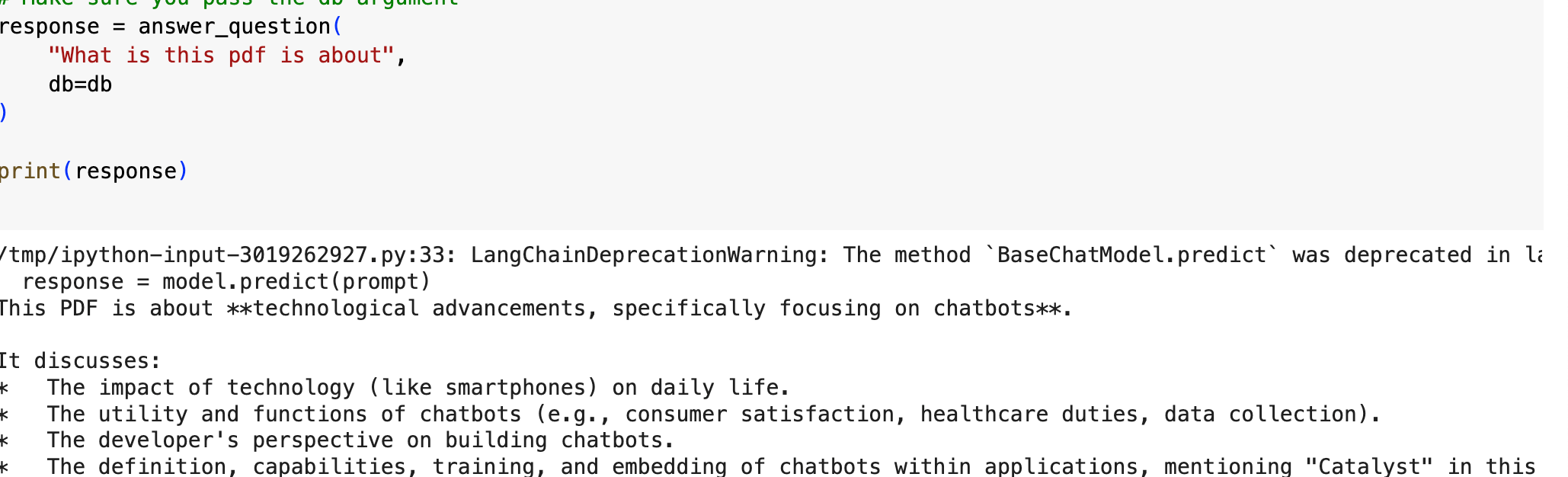
Try it out!
response = answer_question("What risks were listed in the 2023 financial report?") print(response)
You’ll get a concise, factual answer pulled directly from the PDF content.
Response
This PDF is about **technological advancements, specifically focusing on chatbots**.
It discusses:
- The impact of technology (like smartphones) on daily life.
- The utility and functions of chatbots (e.g., consumer satisfaction, healthcare duties, data collection).
- The developer's perspective on building chatbots.
- The definition, capabilities, training, and embedding of chatbots within applications, mentioning "Catalyst" in this context.
Let’s Build It Step-by-Step
Try Gemini or Hugging Face Instead of OpenAI
You’re not locked into OpenAI. Here’s how to swap out providers.
Gemini (Google)
Hugging Face
Skip the complexity with QuickML RAG
After going through all these complex steps, you might wonder is there an easier way? Absolutely. With Catalyst’s QuickML RAG feature, you don’t need to piece together multiple frameworks, manage infrastructure, or write lengthy pipelines.
In just one click, upload your documents and instantly enable context-aware RAG for your applications. Build and deploy a production-ready RAG pipeline in minutes, saving time, reducing complexity, and ensuring scalability effortlessly with Catalyst QuickML.
Build and deploy a production-ready RAG pipeline in minutes.Save time and reduce complexity
Excited to try this? Contact our support team: support@zohocatalyst.com